Best Programmable LED Scoreboards for the Quiet Zone
Last updated August 21, 2026 · By Brandon Dixon ·How we choose products · Affiliate disclosure

I get it. You spent weekends building the couch fortress, stocked the fridge, and hung the jerseys, but your man cave still feels like it’s missing something. Lighting and display gear do more than look cool, because they shape the room. A programmable display that keeps time with the game clock, pulses to the beat, or shows crisp, low-latency stats will turn a decent hangout into a living, breathing entertainment hub. I nerd out over specs, so I’ll translate those numbers into what actually matters when you’re sitting on the couch with friends.
This guide walks you through how to choose the gear that will make that transformation happen. We’ll dig into brightness, pixel density, latency and control protocols, mounting and power, software ecosystems, and build quality so you end up with a centerpiece that performs under real use. I’ll point out what to look for on a spec sheet, and which tradeoffs mean you’ve bought a tool you’ll use versus a toy that gathers dust. Stick with me and you’ll know which device will deliver the wow factor and which won’t.

LED Sign - APP Control Scrolling&Stationary Display DIY Programmable Custom Sign Waterproof Flexible USB 5V for Window Ads,Parties Weddings Store Bar Hotel NEMGOME (Black, 77x8in)

80" LED Screen Display, P1.86 LED Poster, GOB Digital Signage, Spliceable Advertising Display USB Plug&Play, Remote Control for Events/Rentals/Weddings
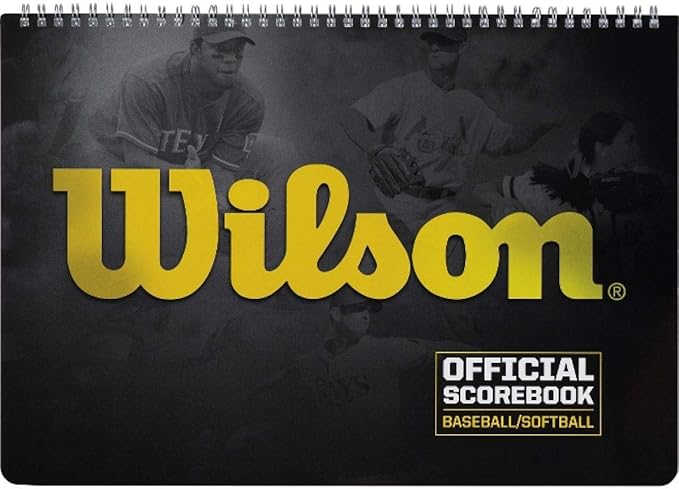
Wilson Spiral Scoreboard

RAYHOME Scrolling Huge Bright Advertising LED Signs, Flexible USB 5V LED Store Sign Bluetooth App Control Custom Text Pattern Animation Programmable Display for Store Car Bar Hotel (27''x5'')
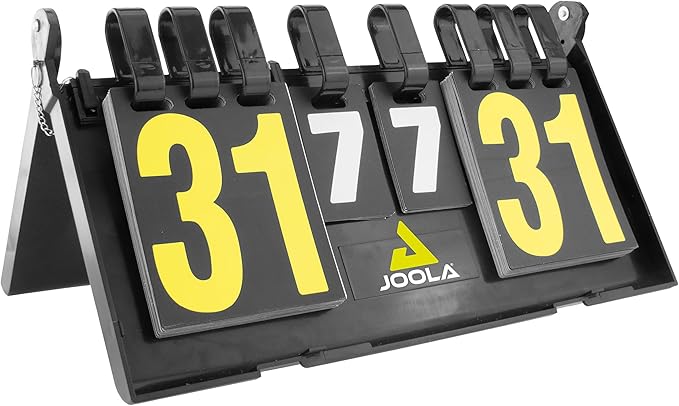
JOOLA Result Table Tennis Scoreboard - Flippable Cards Allow for Easy Score Tracking - Set Up Anywhere - Perfect Addition to Table Tennis Accessories

The Playbook LED Sports Ticker Sign | Live Scoreboard | for Man Caves, Offices and Businesses | Custom Selection Feed (Mobile App), 78" Length
Our Top Pick
The Playbook LED Ticker is the only thing on this page that keeps score without anyone touching it, which on a page about programmable scoreboards makes it the pick almost by default. It is a single-line cabinet, 16 pixels tall with 4mm pixel spacing and full RGB, so logos, live scores and scrolling odds stay crisp at eye level. The cabinet is shallow at about 1.5 inches and ships with wall and ceiling hardware, which is why it works above a TV or over a bar without projecting into the room.
Content flexibility is what separates it from a sign that scrolls whatever you typed. The mobile-controlled Custom Selection feed pushes sports, stocks, crypto and your own messages from a phone, the Hardcore Sports feed runs a nonstop stream, and Home Team mode pins your franchise. One year of service is included, and it takes Wi-Fi or Ethernet for stable live updates.
The one board here that updates itself, which is the whole difference between a scoreboard and a sign.
Key benefits and standout features:
- Live feeds rather than typed messages, so nobody has to update it mid-game.
- 4mm pixel spacing and full RGB for legible scores and readable team logos.
- Shallow 1.5 inch cabinet with wall and ceiling hardware in the box.
- Wired Ethernet as well as Wi-Fi, which matters for anything running live.
- Home Team mode, so the board defaults to something you care about.
- Reads as a sportsbook ticker rather than a novelty sign, which is the effect most people are after.
Be realistic about the limit. The single-line, 16-pixel height is built for tickers and small graphics and will not stand in for a video display. Pros: crisp indoor readability, genuinely useful content choices, easy mounting. Cons: limited vertical resolution for complex graphics, a subscription after the first year, and a non-returnable policy.
Programmable Scoreboards: Customizable Centerpieces That Actually Work
If you want a single piece that announces scores, runs timers, and plays custom animations, programmable scoreboards give you the biggest impact. The magic is in the control layer. Don’t buy on looks alone. Check refresh rates, input latency, frame buffer depth, and how the unit communicates. Scoreboards that support high refresh and low-latency updates (UDP, SPI, or wired Ethernet) keep text and motion crisp during fast scoring or when you feed live data.
Build quality matters. Look at enclosure materials, thermal design, and power delivery specs (voltage rails and amperage headroom) so the unit holds brightness during peak use. Software is critical too, and API or SDK access, character rendering, and font/size handling determine how flexible your display will be. Down below I focus on those firmware and hardware synergies so you can pick a scoreboard that’s programmable, dependable, and fits your wall.
NEMGOME LED Sign
If you want a scoreboard-style focal point that actually pulls the room together, the NEMGOME LED sign is an easy win. The CoolLED1248 app-controlled Bluetooth interface puts full text, color, speed, and preloaded animations on your phone, so you can change a game clock look, roll in custom messages, or let the display pulse with music. The RGBW beads deliver bright, low-glare color that reads well from across the room, and the IP66-rated flexible PU panel rolls up for storage or tailgates. Power is USB 5V2A, so a power bank or phone charger works for off-wall placements.
This one shines because it balances visibility and versatility. It is not a dense video wall. It is built for long-distance readability, bold score-style numbers, promos above a bar, or a scrolling play-by-play when the crew’s packed in. The app includes hundreds of templates and easy DIY tools, so you can set up rotating rosters, countdowns, or themed animations fast. Orientation support (landscape or portrait) and included mounting options make placement flexible, from over the TV to behind the couch.
Who should buy it. If you want a bold, customizable centerpiece that adds character and usable info to your man cave, this is a smart pick. Pros: bright RGBW LEDs, flexible and portable design, robust app customization, USB power. Cons: visible pixelation up close, Bluetooth-only control limits range, and the included mounting tape can be hit-or-miss for heavy setups. Great for fans who want scoreboard vibes without the complexity of full LED panels.
Scorekeeper or Scoreboard, and Why the Difference Costs Money
This is the distinction that decides whether you are happy with a purchase, and almost no listing draws it. The scorekeeper is the mechanism that records the tally. The scoreboard is the surface that shows it. They do not have to be the same object, and on most of what is sold as a scoreboard, they are not.
A board with no keeper built in is a decoration that somebody still has to update by hand. That is fine if you wanted a sign, and it is a genuine disappointment if you thought you were buying something that counts. So before you spend, check for the three things that make a board a keeper: a remote, a timer, and preset game modes. If the listing describes fonts and colors but not modes, it is a display.
The reverse case is worth knowing too. Electronic dartboards and the better LED scorers collapse both jobs into one device, which is why they win in busy rooms where nobody wants the job. What they share is a failure mode: when the app stops talking or the remote battery dies, the score goes with it. Keep a peg board or a pad within reach and the night survives the electronics.
One more filter that saves money. A scorer locked to a single sport gathers dust the moment the room's favorite game changes, so check the mode list before you spend rather than after.
Modular LED Panels for Dynamic Walls
Modular panels give you the immersive, wall-sized visuals that make a man cave feel like an experience. The key specs to check are pixel pitch, panel resolution, and the controller architecture. Pixel pitch dictates optimal viewing distance: tighter pitch gives more detail but increases cost and power draw. Also look at the display pipeline: hardware scaler, refresh rate, and whether the controller uses professional cards or consumer-level USB/Wi-Fi. A robust controller (Novastar or comparable) makes synchronization much easier when you tile panels.
Mechanical stuff matters too. Look for precise mounting frames, toolless panel locking, and replaceable modules so you don’t have to dismantle the entire wall if one board goes bad. Thermal design, LED calibration across panels, and ingress protection all affect long-term uniformity. In the reviews ahead I’ll dig into these specs so you can build a multi-panel installation that behaves like one unbroken canvas.
Digit Height, Pixel Pitch, and Reading It From the Couch
Two numbers decide whether a board is legible from where people actually sit, and they work in opposite directions.
Digit height is the easy one. The sign trade's rule of thumb is about one inch of character height for every 10 feet of viewing distance, so a board read from eight feet needs roughly one inch digits and the same board at the far end of a 25 foot basement wants closer to three. Measure the distance from the seating to the wall before you shortlist anything, because a board that is beautiful at arm's length and unreadable from the sofa is the most common way this purchase goes wrong.
Pixel pitch runs the other way. It is the spacing between LED centers in millimeters, so a smaller number means a finer image: the 4mm pitch on the ticker above, or the 1.86mm on the poster below. Fine pitch buys detail up close and costs money, and past a certain viewing distance your eye cannot resolve the difference anyway. The practical pairing is coarse pitch for big digits read from far away, fine pitch for anything showing logos or graphics at close range, which is the same trade a home theater build makes between screen size and seating row.
Put them together and the shortlist writes itself. A ping pong corner read from ten feet wants tall digits and does not care about pitch. A board over a bar that people stand two feet from wants the opposite.
Pyimgus 80" LED Poster
This 80-inch P1.86 LED poster is the kind of gear that instantly upgrades a man cave from "nice" to "event-ready." The tight 1.86mm pixel pitch and 344×1032 panel give you near-TV clarity even when people sit close. Built with GOB (Glue-on-Board) protection, the panel is splash-proof and dust-resistant, so it's more forgiving than a fragile consumer screen on long nights of craft beer and elbow drifts. The foldable frame, flight case, and 360-degree wheels mean you can move it, store it, or take it to a tailgate without a logistics nightmare.
Control and flexibility are where this one shines. It runs Android 11 and supports a cloud platform plus the LEDArt app for phone, tablet, or PC control. You can push highlight reels, schedule game clocks, or switch to party visuals over Wi-Fi, Ethernet, USB, or even a U-disk. There are built-in 10W speakers and a timing function so the display powers up with game time. Want a bezel-free wall? You can splice up to six units into one bezel-free canvas.
Who should buy this. If you want a centerpiece that doubles as a scoreboard, video wall, and mobile stage backdrop, this is for you. Pros: excellent close-up resolution, rugged GOB build, easy transport, versatile control options, and US-based support with a long warranty. Cons: large and needs proper planning for power and placement, built-in audio is fine for alerts but not a full home-theater experience.
Practical tip: measure doorways and ceiling height, plan where power and Ethernet will land, and decide if you want one showpiece or a multi-panel wall. If you want presence and durability, this deserves serious consideration.
Manual Scoring, and Why the Cheapest Keeper Earns Its Spot
Keeping score is older than writing. The word itself comes from the Old Norse skor, a notch cut into a stick, which means a tally stick with a notch per point is literally a scorekeeper and the whole category on this page is a four-figure elaboration of that idea. Worth remembering before the shortlist gets expensive.
Three families cover every budget, and the right one is a function of the game's speed rather than the price tag. Manual scoring is a pad, a chalk line or a dry-erase board: it costs nothing and depends on somebody remembering. Mechanical keepers are the tactile middle, the cribbage-style peg boards, slide counters and flip cards that need no power and survive decades of bar spills. Electronic keepers do the arithmetic for you, and they are what most of this page reviews.
The best rooms keep one of each. An LED board for the loud nights and something mechanical on the shelf for when the remote battery dies, which it will, generally in the middle of the only close game of the evening. That is the honest case for the two cheapest products on this page, and it is why they are here rather than as filler.
One piece of etiquette worth inheriting. Because a score was once a notch in a public tally, a keeper's call has always stood unless it was challenged at the moment it was made. Modern boards inherit that authority, which is most of why a visible agreed score keeps the peace better than anyone's memory.
To be clear about what this is, because the listing title says scoreboard and the product is a book: it is a landscape, spiral-bound baseball scorebook with space for 17 players and 12 innings, plus a pitch count column, lineup sheets and a short scoring guide. Nothing about it lights up. It is here as the manual keeper the section above argues for, and at the price of two coffees it is the cheapest insurance on the page.
The diamond boxes are roomy, so you can use your own shorthand instead of wrestling with tiny pre-printed codes. It is light enough to throw in a bag for a live game and durable enough to leave on the credenza next to the LED gear.
Pros: a familiar Wilson build, a format many scorers like, and pitch counts up to 105 for tracking multiple pitchers. Cons: no pre-marked small boxes for balls and strikes, a few buyers noted dimensions differ from older descriptions, and there is no dedicated pitcher-summary area. It will not sync with anything, so a score that needs to reach an LED board gets typed in by hand. If you keep score properly, or you want a record of the season rather than just tonight, this is the sensible pick.
LED Marquee Signs for Retro Flair with Modern Control
Marquee signs bring nostalgia, and modern LED marquee-style displays add flexibility. When choosing one, prioritize pixel density per character, diffusion layers for even light, and PWM frequency to avoid camera flicker. The control system should let you upload custom text, animations, and schedules via a reliable app or a local USB option rather than forcing cloud-only workflows.
Durability comes down to build materials and sealing, especially if you put the sign in a garage or semi-exposed spot. Check the chassis for reinforced mounting points and front access for maintenance. In the reviews I’ll inspect letter clarity, animation smoothing, and responsiveness so you end up with a marquee that looks great and behaves predictably.
Marquee, Neon, or Matrix
Three technologies get sold under the same "LED sign" heading in this category, and they are built differently enough that the choice is not really about looks.
A marquee letter is a hollow box with individual bulbs traced around its face, the old theater-canopy idea shrunk to wall scale. It gives you the dotted, showbiz look and it is repairable bulb by bulb, which matters over years. Home sizes run 12 to 36 inches tall, and the same one-inch-per-ten-feet legibility rule applies: a six inch letter over a twelve foot bar reads as a label rather than a sign.
An LED neon sign is diodes sealed inside flexible silicone tubing, bent into a continuous line and mounted on an acrylic backer. It runs on 12 or 24 volts, draws roughly 80 percent less power than glass neon, and its diodes are rated at 50,000 hours or more against 10,000 to 15,000 for a glass tube. What it cannot do is change what it says.
A matrix display, which is what the rest of this page reviews, is a grid of individually addressed LEDs that can show anything you send it. That is the whole point on a scoreboard page: the score changes, so the sign has to.
The one part that actually fails on all three is the driver. The flex or the panel rarely dies; a cheap unlisted power supply hums, overheats, or quits inside a year and takes the sign with it. Buy the one with a listed driver and keep the adapter somewhere ventilated.
RAYHOME Scrolling LED Sign
This flexible USB-powered LED panel nails the basics a man cave needs: bright, low-heat output and an app that actually makes customization fun. Plug it into any 5V USB supply, use the Bluetooth app to type messages or pick animations, and you’ve got an instant focal point for game nights. It reads well from across a room and punches through ambient lighting, so it works above a bar, behind the couch, or mounted in a garage window to announce the score.
The sign’s strength is versatility. Multiple sizes let you choose a small strip over a shelf or a longer 27"x5" marquee across a wall. The app offers scrolling text, directional effects, pixel art and preset graphics. Practical note: large sizes are best for messages and animated bars of color, not fine-detail photos. For logos, stick to bold text and simple icons for the cleanest look.
Installation is mostly painless. The panel is thin and bendable, and the included tape is handy for temporary mounting. For permanent installs you’ll want heavy-duty double-sided tape, Velcro strips, or a couple of small screws to keep it flat. Plan for occasional Bluetooth hiccups and, rarely, LED rows failing after heavy use. Keep the original power adapter and try alternatives if the panel looks dead.
Who should buy it? Casual man cave builders, streamers who want an easy backdrop, or anyone wanting a programmable scoreboard vibe without complexity. Pros: bright, flexible sizes, simple app, low power. Cons: adhesive can be hit-or-miss, occasional reliability reports, not photo-grade resolution.
Where the Board Goes, and What Happens When It Dies
Mounting is where a good board becomes a board nobody updates. The rule is short: both teams have to see it without turning their backs on the table. A scorer that requires someone to walk across the room will not get updated past the second game, and once the tally is stale the board has stopped doing its job even though it is still lit.
That sounds obvious until you look at the walls actually available in most rooms. The one you want is usually the one behind the play, which is also the one in the line of a stray dart or a mishit ball. Between a board that is perfectly placed and eventually broken and a board that is slightly off-axis and intact, take the second. Height helps here too, because most of what flies in a game room flies low.
Power, Cable, and the Fallback
An LED board needs an outlet, and the cable run is the part people plan last and regret first. Anything permanent wants a feed routed behind trim or through a channel rather than a cord taped down a wall, and the moment to do that is while you are choosing the position rather than after the anchors are in.
Then keep a mechanical fallback nearby. Every electronic keeper on this page fails the same way: the app stops talking, or the remote battery dies mid-match, and the score vanishes with it. A flip-card board or a peg counter on the shelf costs almost nothing and means the night carries on. That is not a hedge against buying electronics, it is the reason the flip-card scoreboard further down this page earns a place next to the ticker rather than instead of it.
One last placement note. Auto-brightness is worth having on anything that sits where daylight reaches, because a board calibrated for a dark room is painful at two in the afternoon and one calibrated for daylight disappears at night.
What These Boards Cost to Run, and What Wears Out
The price ladder in this category is wider than almost any other man cave purchase, and it maps onto capability more honestly than most. A portable LED board with a remote typically lands somewhere between $40 and $200. Wall-mounted displays climb from there, and the professional-grade panels at the top of this page are a different market wearing the same category name.
Running cost is the part nobody worries about and nobody needs to. LEDs at this scale draw less than the lamp next to them, and the efficiency gap against the old bulb-based signs is not subtle: one theater that swapped 3,600 incandescent marquee bulbs for 1.3 watt LEDs cut its marquee energy use by 90 percent. That is why these things get left on as a permanent glow rather than switched off after the party.
What wears out is smaller and more annoying than the panel. In order of how often it bites:
- The driver or power supply. Rated for barely more than the sign draws, it runs hot and quits. One rated about 20 percent above the load runs cooler and leaves headroom if you ever add a second sign to the same feed.
- Sealed LED modules. A sign with non-replaceable diodes is a throwaway the day one section dims. Socket-based and modular designs are a swap.
- The subscription, on anything running live feeds. Not a hardware failure, but it ends the same way: a board that stops updating. Check the term before you buy, not after the first year.
Give it a place on the maintenance round and most of this never comes up. Wipe the face, check the adapter is not buried under something, and keep the firmware current on anything networked.
The Six Picks Side by Side
Sorted by what each one is for rather than by price. Ratings are the current Amazon averages for each listing.
| Pick | What it is | Rating | Buy it if |
|---|---|---|---|
| The Playbook LED Sports Ticker Sign | live-feed ticker, 4mm pitch | 4.5 | you want scores that arrive without anyone typing them |
| NEMGOME LED Sign, app-controlled | programmable matrix sign | 4.3 | the board should say whatever you tell it to |
| 80" LED Screen Display, P1.86 LED Poster | fine-pitch modular panel | 4.7 | it is the video wall, and the budget is real |
| RAYHOME Scrolling Huge Bright Advertising LED Signs | flexible USB scrolling sign | 4.7 | you want the effect for the price of a round |
| JOOLA Result Table Tennis Scoreboard | flip-card, no power | 4.5 | it has to work when the batteries do not |
| Wilson Spiral Scoreboard | hanging spiral counter | 4.1 | the game is casual and the score should be too |
Sports Scoreboards: Authentic Stadium Feel for Home Arenas
If you want a stadium vibe, sports-grade scoreboards deliver authenticity with timers, shot clocks, and multi-zone displays. Key metrics are module size, pixel pitch relative to viewing distance, and synchronization across panels. Look for systems with redundant power and network options if you need uninterrupted display during long events.
Operationally, check for dedicated control consoles, compatibility with external timing systems, and firmware that supports sport-specific layouts. Mechanical robustness is crucial: reinforced enclosures, serviceable front panels, and certified mounts for safety. I’ll be testing real-time sync, visibility under bright conditions, and how practical it is to integrate full-featured scoreboard controls into a home environment.
JOOLA Result Scoreboard
This compact flip-card scoreboard is a no-nonsense analog option for a man cave that likes simplicity. Made by a heritage table tennis brand, it folds flat for storage and uses sturdy plastic cards to track points with a single, satisfying flip. The design prioritizes reliability over bells and whistles. If you want something that survives spilled drinks and rowdy matches, this is a dependable, tactile solution.
It’s great for portability and focused play. Pros: durable for casual use, light to carry, and intuitive to operate. Cons: not programmable, no app control or illumination, and the digits can feel stiff at first. If you host quick games or want a backup to your LED setup, this is a classic pick.
Keep it next to your LED accent lights to anchor a ping-pong corner, or on the bar for darts and drinking games. For fuss-free scoring that keeps the focus on play, this one earns its spot on the shelf.
Wrapping Up
You want a man cave that actually performs, not one that only photographs well. Here is the practical takeaway. For live information that arrives without anyone touching it, the Playbook LED Ticker is the pick, and it is the only board here that keeps score by itself. For a sign that says whatever you tell it to, the NEMGOME LED Sign and the RAYHOME scrolling sign cover the same job at very different prices. For near-TV clarity and real presence, the Pyimgus 80" poster or a tiled modular wall with a professional controller gives you tight pixel pitch, proper panel sync and replaceable modules.
I focused on the specs that matter: digit height against viewing distance, pixel pitch against how close people stand, refresh rate and input latency for smooth motion, PWM frequency to avoid camera flicker, and power supply headroom so brightness holds under load. My recommendation depends on what you want most:
- Want live stats with nobody minding the board: the Playbook LED Ticker, on wired Ethernet if the run allows it.
- Want a programmable sign you control from a phone: the NEMGOME LED Sign, or the RAYHOME if the budget is tight and the message is short.
- Want a centerpiece that dominates the room with video-grade fidelity: the Pyimgus 80" poster or tiled modular panels, insisting on GOB protection and a controller that supports wired Ethernet and frame buffering.
- Want something that cannot fail: the JOOLA flip-card board or the Wilson spiral, sitting alongside whatever else you buy rather than instead of it.
Before you click, measure your sightlines and shortlist two models. Verify three points: digit height against seating distance, power rail capacity with 20 to 30 percent headroom, and the control protocol, with Ethernet for rock-solid reliability and Wi-Fi for convenience. Install over a weekend, test firmware and app responsiveness under live loads, and tweak brightness and PWM settings so nothing flickers on camera.
If you want help translating your wall dimensions, seating distance and power limits into an exact model choice, send me the room measurements and your top priority, whether that is live accuracy, legibility or video fidelity, and I will map out the setup step by step.